Adding fibers to v8: efficiency + clarity in SSJS
by Greg Slovacek on October 26th, 2010 at 9:00 am
Historically, webapp development has required painful tradeoffs between code clarity and performance. This is the story of how we added cooperative threading to server-side JavaScript (v8) to get the best of both worlds.
When prototyping, you make rapid progress by ignoring performance and writing code that closely mirrors your mental model of what your application does. The transition to a scalable production service generally requires rearranging code to minimize requests to the storage layer, making the code harder to read and change. To build an application of Asana’s complexity, we need the simplicity and agility of prototype code with the performance of production code.
This project was done as part of our work on the Luna framework, the programming environment we’re developing in-house in order to deliver the rich functionality and extreme responsiveness of the Asana product (currently in beta).
Simplicity versus database performance
Prototypes can pretend that the web server has random access to all data, hitting the database serially every time UI code accesses a value. But high-performance webapps need to minimize database (or memcache, etc.) roundtrips. So on the one hand, we want to batch database queries as aggressively as possible, across different parts of the page. On the other hand, for clarity we want code that loads data to be near code that renders that data.
The joy of prototyping
Imagine we’re building a simple two-pane webmail client. The left pane shows each folder, annotated with its unread message count. The right pane shows each message in the selected folder, displaying its subject and a snippet of its body.
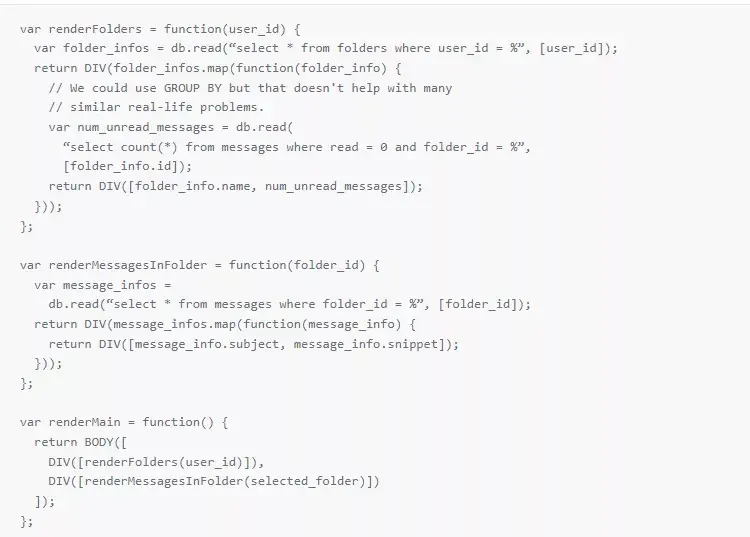
If we don’t care about performance we can write simple, clear code:
var renderFolders = function(user_id) {
var folder_infos = db.read(“select * from folders where user_id = %”, [user_id]);
return DIV(folder_infos.map(function(folder_info) {
// We could use GROUP BY but that doesn't help with many
// similar real-life problems.
var num_unread_messages = db.read(
“select count(*) from messages where read = 0 and folder_id = %”,
[folder_info.id]);
return DIV([folder_info.name, num_unread_messages]);
}));
};
var renderMessagesInFolder = function(folder_id) {
var message_infos =
db.read(“select * from messages where folder_id = %”, [folder_id]);
return DIV(message_infos.map(function(message_info) {
return DIV([message_info.subject, message_info.snippet]);
}));
};
var renderMain = function() {
return BODY([
DIV([renderFolders(user_id)]),
DIV([renderMessagesInFolder(selected_folder)])
]);
};
Batching
The problem is that we actually do care about performance. The code above makes a serial request to the database for each message and for each folder, adding latency for each request. To improve on this we need to execute multiple database requests at once.
Different storage and caching systems have different ways of combining requests. For example, MySQL supports multiple statement execution. Using one of these batching APIs is easy. The hard part of batching is changing the application to use it. Let’s explore some ways to do this.
Manually batching requests
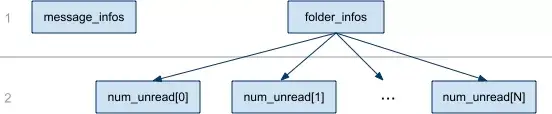
We can restructure the code to collect the initial reads in one place. After those, we can do any reads that depend on results from the first reads. In our example, we need to read the message counts after reading the list of messages. In fact, for any page there’s some sequence of dependencies that represents the critical/longest path, and ideally our page would load in exactly that many database requests. Using a dependency graph to describe an application’s data needs, we can discover the best-case number of round-trips to the database: the graph’s height.

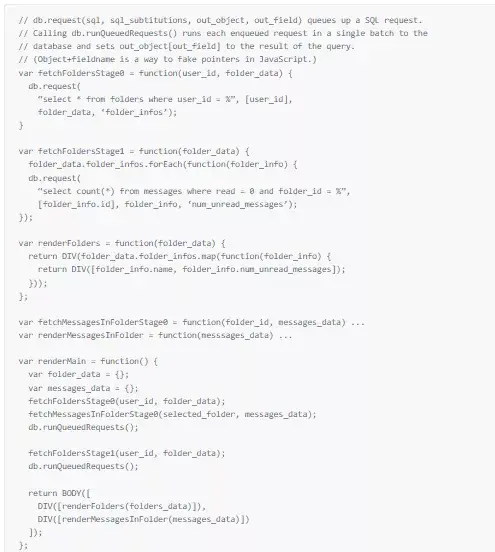
The prototype code above makes a request for every node in the graph, instead of just the two required. If we manually arrange the reads to be optimal, we get:
// db.request(sql, sql_subtitutions, out_object, out_field) queues up a SQL request.
// Calling db.runQueuedRequests() runs each enqueued request in a single batch to the
// database and sets out_object[out_field] to the result of the query.
// (Object+fieldname is a way to fake pointers in JavaScript.)
var fetchFoldersStage0 = function(user_id, folder_data) {
db.request(
“select * from folders where user_id = %”, [user_id],
folder_data, ‘folder_infos’);
}
var fetchFoldersStage1 = function(folder_data) {
folder_data.folder_infos.forEach(function(folder_info) {
db.request(
“select count(*) from messages where read = 0 and folder_id = %”,
[folder_info.id], folder_info, ‘num_unread_messages’);
});
var renderFolders = function(folder_data) {
return DIV(folder_data.folder_infos.map(function(folder_info) {
return DIV([folder_info.name, folder_info.num_unread_messages]);
}));
};
var fetchMessagesInFolderStage0 = function(folder_id, messages_data) ...
var renderMessagesInFolder = function(messsages_data) ...
var renderMain = function() {
var folder_data = {};
var messages_data = {};
fetchFoldersStage0(user_id, folder_data);
fetchMessagesInFolderStage0(selected_folder, messages_data);
db.runQueuedRequests();
fetchFoldersStage1(user_id, folder_data);
db.runQueuedRequests();
return BODY([
DIV([renderFolders(folders_data)]),
DIV([renderMessagesInFolder(messages_data)])
]);
};
This code makes only two requests to the database: one for each level of the dependency graph. However, it is harder to read and modify than the first version. Changing how one part of the page renders requires modifying the fetch and render functions in complex error-prone ways. (A common mistake is removing render code but forgetting to remove the corresponding fetch code.) We also broke encapsulation by forcing renderMain to understand how many batches are required for each component.
Asynchronous programming
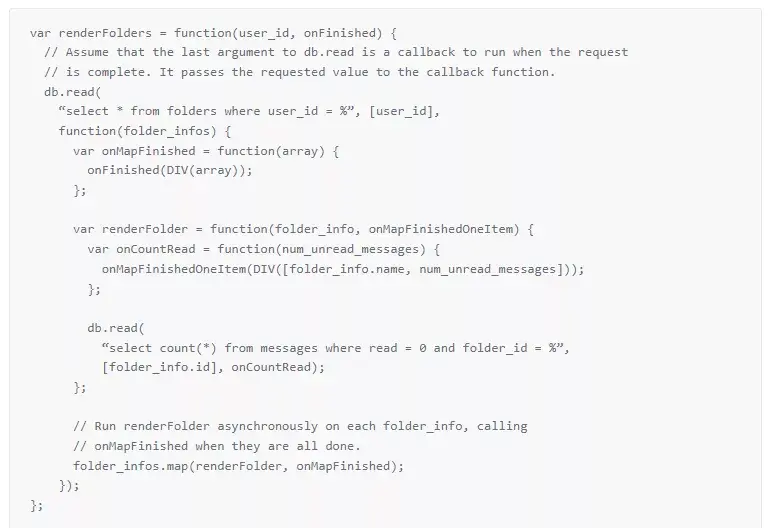
Asynchronous programming lets us keep the fetching and rendering code together while batching otherwise serial requests. We do this by defining callbacks to run after data has been loaded.
Here’s an asynchronous version of part of the code:
var renderFolders = function(user_id, onFinished) {
// Assume that the last argument to db.read is a callback to run when the request
// is complete. It passes the requested value to the callback function.
db.read(
“select * from folders where user_id = %”, [user_id],
function(folder_infos) {
var onMapFinished = function(array) {
onFinished(DIV(array));
};
var renderFolder = function(folder_info, onMapFinishedOneItem) {
var onCountRead = function(num_unread_messages) {
onMapFinishedOneItem(DIV([folder_info.name, num_unread_messages]));
};
db.read(
“select count(*) from messages where read = 0 and folder_id = %”,
[folder_info.id], onCountRead);
};
// Run renderFolder asynchronously on each folder_info, calling
// onMapFinished when they are all done.
folder_infos.map(renderFolder, onMapFinished);
});
};
Fun, huh? We find asynchronous code longer and harder to read (and write) than synchronous code. Debugging is harder because the original stack is lost by the time a callback is run. Even in this simplified example, the code is significantly more obtuse.
Clarity + Performance = Fibers
Threads let engineers write code that runs asynchronously but looks synchronous, with meaningful stack traces and clearer control flow. But traditional preemptive multithreaded programming is notorious for introducing subtle race conditions. Fibers are cooperative threads that let programmers explicitly define when each thread should pause and resume. With fibers, we can write efficient code that looks almost like prototype code – and without the heisenbugs of preemptive threading.
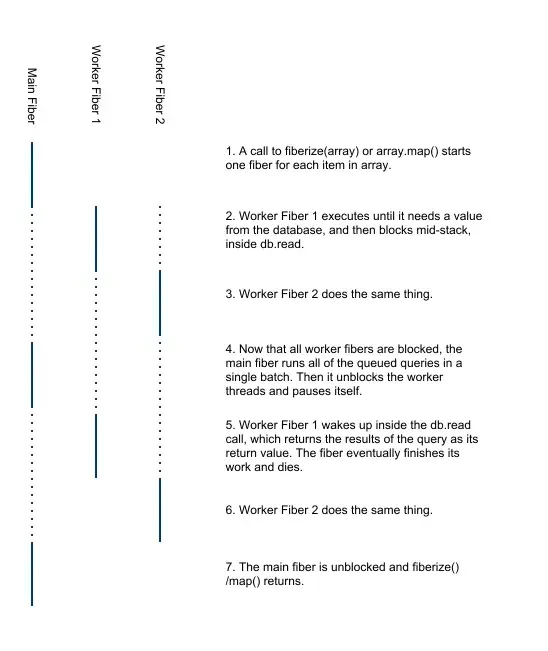
Fibers allow us to write a simple system for batching database requests. We start building the page on one fiber. At various points the code spawns more fibers to work on independent parts of the page, each pausing as soon as it needs to read from the database. Once all fibers are blocked, we perform all queued-up requests in a single batch, and then resume the blocked fibers.
Most of these fibers are introduced by our framework. For example, we have a version of map() that starts a fiber for each item in the array and waits until those fibers have finished before returning the output array. In other cases, such as around the example’s calls to renderFolders() and renderMessages(), we explicitly create new fibers.
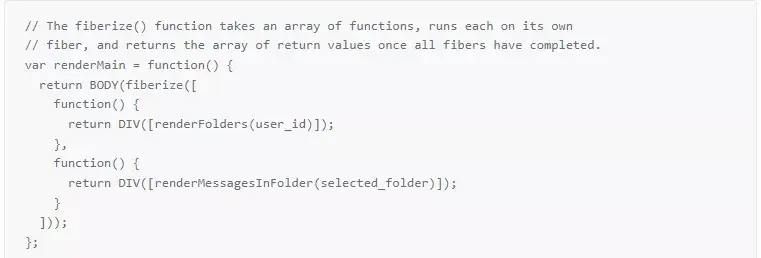
Here is a fibered version of renderMain(). (The rest of the code didn’t need to change from the prototype version.)
// The fiberize() function takes an array of functions, runs each on its own
// fiber, and returns the array of return values once all fibers have completed.
var renderMain = function() {
return BODY(fiberize([
function() {
return DIV([renderFolders(user_id)]);
},
function() {
return DIV([renderMessagesInFolder(selected_folder)]);
}
]));
};
Using fibers lets us combine into one database request the reads from completely different parts of the code. Code that looks very similar to the initial prototype code now runs with the optimal number of database requests: one per level of the data dependency graph.
Implementing JavaScript fibers in v8
Few languages support fibers natively (though support was recently added to Ruby). We write most of our server code in JavaScript and run it under Google’s v8 engine, the same JS runtime that Chrome uses. Fortunately the v8 codebase is excellently structured, so we were able to add fiber support in just a few days. We made our changes in v8cgi, a library of server-oriented extensions to v8. (Look for fibers.cc.).
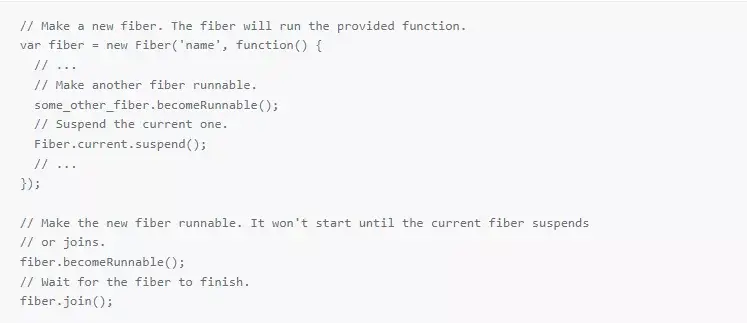
Here’s a sample of the API:
// Make a new fiber. The fiber will run the provided function.
var fiber = new Fiber('name', function() {
// ...
// Make another fiber runnable.
some_other_fiber.becomeRunnable();
// Suspend the current one.
Fiber.current.suspend();
// ...
});
// Make the new fiber runnable. It won't start until the current fiber suspends
// or joins.
fiber.becomeRunnable();
// Wait for the fiber to finish.
fiber.join();
That’s almost the entire API. We don’t need any synchronization primitives because only one fiber runs at a time and control only changes when suspend() or join() is called.
Conclusion
There is a tension between writing clear, well-abstracted code and writing code that makes efficient use of the database. Adding fibers to v8 allowed us to resolve this tension. In taking a small amount of time to solve this problem right, we have made our entire engineering team more efficient for the long run.
Simplicity; performance; w00t.
Excited by this technology and passionate about products that improve the efficiency of communication? We’re hiring.


[...] they are discussing their patch to v8cgi that adds in support for their own fiber [...]
Ajaxian » Adding fibers to your server side v8 diet offers efficiency and clarity
26 Oct 10 at 9:03 am
The approach and pitch seems broadly similar to Structured Javascript (not that I’m an expert on either!). Could you do a quick high-level compare/contrast between Fibers and SJS? http://stratifiedjs.org/sjsdocs
Dan Brickley
26 Oct 10 at 10:35 am
[...] they are discussing their patch to v8cgi that adds in support for their own fiber [...]
Adding fibers to your server side v8 diet offers efficiency and clarity | pro2go Designs Blog
26 Oct 10 at 10:42 am
@dan: StratifiedJS is definitely cool. The differences are that SJS runs in unmodified browsers but it compiles your code. The compilation step means that the browser is not running the code that you typed in, making profiling and debugging harder.
Malcolm Handley
26 Oct 10 at 11:28 am
[...] they are discussing their patch to v8cgi that adds in support for their own fiber [...]
Adding fibers to your server side v8 diet offers efficiency and clarity | Silver-Tab.com
26 Oct 10 at 11:34 am
[...] they are discussing their patch to v8cgi that adds in support for their own fiber [...]
Adding fibers to your server side v8 diet offers efficiency and clarity | The best Tutorials
26 Oct 10 at 1:41 pm
[...] they are discussing their patch to v8cgi that adds in support for their own fiber [...]
Adding fibers to your server side v8 diet offers efficiency and clarity | Programming Blog
26 Oct 10 at 2:37 pm
[...] note about how we're using fibers to help simplify the code around query batching at Asana: http://asanablog.wpengine.com/?p=49Fibers are cool, but not because they were a herculean achievement of effort. A working-with-bugs [...]
Jack Stahl's Post - Quora
26 Oct 10 at 2:46 pm
Excuse my n00bness but do Fibers naturally not run concurrently? I haven’t really read a ton about the diff between threads/fibers but if that is the case the implementation sounds pretty awesome.
Is there any concern that read heavy applications (with large numbers of worker fibers) would become slow or are the main performance concerns fixed by batching queries?
Either way, sounds amazing guys, keep up the good work!
Jason Joseph
26 Oct 10 at 5:01 pm
@Jason: You are correct: fibers are by definition not concurrent. Our fibers are actually pthreads (with synchronization to ensure that only one runs at a time) so an app with lots of fibers will run slowly if the OS’s scheduler is inefficient when there are many blocked threads. We haven’t had a problem with this, however. The more important limit on the number of fibers that you can have is that each fiber needs its own stack.
Malcolm Handley
26 Oct 10 at 6:37 pm
That is truly amazing. And I guess you will even be able to pre-process the different sql queries in the queue in order to merge them when possible. That way you don’t only reduce the number of round trips to the database but also the number of queries executed.
In your example: “select folder_id, count(*) from messages where read = 0 and folder_id in (%) group by folder_id”, [folder_info_1.id, folder_info_2.id...]);
That can be hard if you write raw sql as shown in the example, but with a good ORM layer that should be much easier.
Excellent job!
Florian Jourda
26 Oct 10 at 6:48 pm
@Florian: Excellent point. At Asana we don’t actually write raw SQL, we use a custom ORM and we (mostly) batch things at the level of field access on objects. More complicated queries still potentially have to be combined in some sort of custom fashion. However, there are also other layers of data access (specifically memcache) that support mget directly, and so merging lookups is trivial.
Jack Stahl
26 Oct 10 at 8:16 pm
You don’t need fibers to create a function that runs an array of other functions returning an array of the results ?
Jonah Fox
27 Oct 10 at 12:56 am
[...] This post was mentioned on Twitter by tom robinson, Alexander Kashtanov. Alexander Kashtanov said: RT @tlrobinson: Adding fibers to v8: efficiency + clarity in SSJS: http://asanablog.wpengine.com/?p=49 /via @asana [...]
Tweets that mention Adding fibers to v8: efficiency + clarity in SSJS at Asana -- Topsy.com
27 Oct 10 at 9:46 am
@Jonah: Fibers help if you want to combine database reads in the different functions into a single batch.
Malcolm Handley
27 Oct 10 at 10:30 am
Excellent work. Will you be contributing the fiber work back to the V8 codebase? I could see a lot of people doing server-side JS really enjoying having this available. Might also get more visibility for Asana in the technical community.
Rand Fitzpatrick
27 Oct 10 at 1:59 pm
@Rand: the code is already in the v8cgi codebase. We put it there because we already know how to write v8cgi modules and found it more convenient. We may try to get it into v8 but it’s not a priority.
Malcolm Handley
27 Oct 10 at 4:00 pm
[...] Believe in no technology religion The folks at Asana are adding the Fiber support for v8cgi – http://asanablog.wpengine.com/?p=49 It would be great if node.js could support Fibers too natively.Insert a dynamic date [...]
Could Node.js support threads in the future? - Quora
28 Oct 10 at 10:44 am
@Malcolm: Awesome! Glad it’s out there, even if not in the main v8 code base. Thanks again!
Rand Fitzpatrick
2 Nov 10 at 4:55 pm
Hi,
how does the main fiber decide when to unblock and hit the database. I would assume that this needs to have an intelligence mechanism to hit the db often during less load, and more batching during high load?
like for instance: if you are waiting to cross the road during high traffic, it makes sense for people to batch up and wait for the green signal to cross the road. but when there is less traffic, it might be waste of time to wait for the signal(like indian roads), here if the signal is intelligent and reads the traffic conditions, the system might be very efficient.
so my question is: is the main fiber set to be like an intelligent traffic signal system? or should i go read more books?
thanks.
Srinivas Mangipudi
3 Dec 10 at 6:51 pm
@Srinivas:
The main fiber unblocks and hits the database as soon as all of the worker fibers have indicated they are blocked and cannot proceed without more data.
Fiber-switching overhead is low so it is not really a “waste of time” to wait for the signal, so to speak. Even under light load it is generally more efficient to make fewer round trips to the database, as long the overhead required to save those round trips is low enough (which it is in this case).
So the main fiber does not need much “intelligence” at all to make things more efficient; the logic is quite simple. It may be possible to eke out some more performance gains by doing database fetches in the background, but we’d have to have async I/O for that and we haven’t felt the need to move in that direction yet.
[sorry for the late reply - we had some spam/moderation issues to address and then the holidays ..]
Greg Slovacek
4 Jan 11 at 6:31 pm
I’ve recently used fibers in Ruby to do some really interesting batching of data access to blocking/remote resources. Some Ruby projects that have come in handy are:
https://github.com/eventmachine/eventmachine
https://github.com/igrigorik/em-synchrony
Also, check out the talk here for good introductory information on fibers.
http://www.mikeperham.com/2010/01/27/scalable-ruby-processing-with-eventmachine/
Jordan Moncharmont
7 Feb 11 at 7:13 pm
What is Asana’s Luna technology framework?…
Luna is a Javascript-based web framework that powers the Asana product. I’ll lay out some of the core subsystems, and interlace with some real live code (with their real comments) to give you a taste. I’ve selected the code somewhat arbitrarily to sh…
Quora
8 Feb 11 at 1:17 am
Woo! I’ve actually developed a very similar platform using a hybrid event/fiber approach with V8. I’ve dug deep, and there’s really not any performance difference between the two. If you keep enough threads available in a pool, things happen very quickly. And with Linux 2.6+ pthreads have a very very light memory footprint. Also if you are doing tons of data processing, or gzip, you can very easily introduce a blocking gzip() function that can actually use multiple CPU cores! This takes something as complicated as effective SMP and allows you to use it by simply calling var out = gzip(data); in your code. This can also allow you do something like PHP style web requests (linear, one call stack) without the nasty overhead.
Colin Godsey
16 Jun 11 at 4:30 pm
in regards to the memory footprint lineon the above comment, pthread stacks use COW, generally only requiring a small memory page for the base of the call stack. this generally doesnt ever require the full allocation of the stack, but after doing some deep calls (recursion?) and more of the stack is allocated, threads will eventually take up more memory, even when waiting idle on a new task. so its good to recycle your threads now and then!
Colin Godsey
16 Jun 11 at 4:35 pm
Hi Colin – very cool! Our app uses stateful servers and it does some very heavy lifting during initial page load (uses lots of fibers, very deep stacks), but subsequent requests may be considerably lighter. Assuming the process keeps unused stack pages committed, your idea of re-creating the fibers to reset the stack sizes is interesting.
When you say there’s no “performance difference between the two”, which two approaches are you referring to?
Greg Slovacek
21 Jun 11 at 5:09 pm