Introducing Personal Projects: Easy Task Sharing for Friends and Family

avatar

by Jack Stahl
June 21st, 2012

Asana is great for sharing projects and tasks with teammates at work, but it wasn’t initially optimized for quickly sharing tasks with friends and family. We discovered that the more we loved using Asana at work, the more we wanted to use it in our personal lives.

So, we’ve created a new “Personal Projects” section of Asana, which you can find at the bottom of the new-and-improved left pane. When you first open Asana, you’ll see an expanded view of a Workspace — click the back arrow to view all Workspaces. Personal Projects is like a special Asana Workspace, optimized for sharing tasks across all aspects of your personal life.
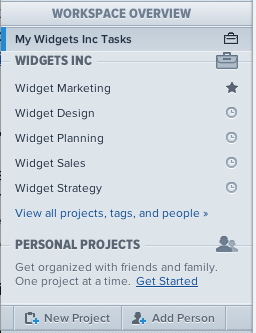
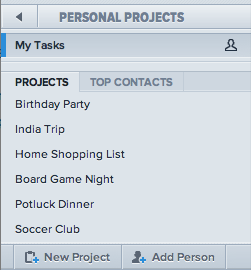
New Left Pane!Zoomed In

Many people like to keep work projects and personal projects separate — just as they might separate work email and personal email. With Personal Projects, you can keep a distinction between work and personal while still having access to both types of projects in one place, without having to sign in to multiple accounts. (You can set a different email address for each Workspace, including Personal Projects.)

Each Project in Personal Projects has its own sharing controls, so you can have a shopping list with your roommates while organizing a birthday party with your family — just invite the appropriate people to each Project. You can share single Tasks like “Send me your dentist recommendation” or a full Project like “India Vacation.” Click on the Share button and add people by email. Or, if you don’t want to add people one by one, you can also choose “Make public to anyone with the link” to get a URL that you can send to a group.

Share with a link!

The great thing about Personal Projects is that you can share items with different groups of people. Friends and family will see what you’ve shared with them in their own Personal Projects section, but won’t have access to any of your other Projects or Tasks. Personal Projects is perfect for ad hoc sharing of Projects, Tasks, and one-off lists with friends and family.


22 Comments

  1. avatar RPMODE says:

    How do I DELETE this workspace? The inability to add Tags makes this pretty inefficient for me.

  2. avatar Dave Mackey says:

    Thanks for adding this. I know it has been there for a while, but I’m just getting to read the post on it now…This is a huge help in productivity for me.

  3. avatar Rémy says:

    Asana is free up to 30 Persons – does this restriction also apply to Personal Projects, if sharing litte things with many friends?

  4. avatar Peter Venero says:

    This is a good idea, in theory. But I see that comments and actions that are being made in my Personal Projects are also being mirrored in the actual Projects. Surely either something is wrong, or I’m missing the point.

    Shouldn’t the actions taking place in my Personal Projects be hidden from the actual (professional) Project Workspace? Otherwise, what’s the point?

  5. avatar Vikki says:

    Are my personal projects still private if I am using the free edition?

  6. avatar Peter Venero says:

    I still don’t get it…

  7. avatar Tyler says:

    Really like “Make public to anyone with the link.” But I second Peter and RPMODE’s comments. Keep up the good work, though!

  8. avatar Dallon Christensen says:

    My family (including my 8-year-old stepson) uses Asana, and I didn’t want to set sharing for each individual project in the Personal space. We created a “Family” workspace and gave sharing access to the workspace for the whole family. I just create chore projects, grocery lists, etc. in this workspace. I then use the Personal projects space for truly personal projects.

  9. avatar Rick says:

    Can you tell me why you decided NOT to include tags in the Personal Workspace??

  10. avatar Henrik says:

    Trying to evaluate asana for both business and personal use. How come you don´t get tags in the personal workspace?

  11. avatar Marco says:

    I like the concept and I’m just beginning to use it. Thanks!

    I also agree with the other commenters here, tags would definitely be nice to have and it seems odd that they would be left out.

  12. avatar Blaize says:

    It would be very helpful to include tags in the Personal Projects workspace.

  13. avatar Fred says:

    I agree that it would be nice to have the flexibility to either delete this space or rename it, but at a minimum, tags should be added.

  14. avatar greg says:

    Previously, I created a workspace named Personal and simply didn’t share it with anybody; but, had the option of sharing a project with somebody if I wanted to.

    If I understand this feature right, the difference is that using a normal workspace, one can share the workspace and all projects are implicitly shared unless you make a project private or exclude somebody. Using the new Personal Projects I cannot share the workspace, but can share an individual project.

    So, basically, the difference is an implicitly inclusive filtering model versus an implicitly exclusive filtering model?

  15. avatar Blaine says:

    Tags in personal workspace please!

  16. avatar giingii says:

    Love Asana!!

    Needs tags for personal projects!

  17. avatar Argh says:

    Please put tags in personal workspaces, otherwise it makes it unuseable.

  18. avatar Tim says:

    Funny idea with the no tags and reorder for personal projects. I like that! And I like the joker! “Do I look like a guy with a plan??” ;) Some Men Just Want to Watch the World Burn…

  19. avatar Carlos says:

    common guys… please add the possibility to assign tags

  20. avatar Patrick says:

    Asana is great. My company started using it, so I use it for the business stuff. My personal tasks are managed with Things.

    Then I thought… wow, cool. Personal projects. I can drop Things and have a single tool.

    But there are no tags. So, Things wins against Asana and I stick to it for now.

  21. avatar Lou says:

    Hello, for me too it would be nice to hava Tags in personal workspace please.

Add a Comment

Your email address will not be published. Name/Email fields are required.


You may use these HTML tags and attributes: <a href="" title=""> <abbr title=""> <acronym title=""> <b> <blockquote cite=""> <cite> <code> <del datetime=""> <em> <i> <q cite=""> <strike> <strong>