Introducing Hypertext: “@” Links for Projects, Tasks, People, And Tags
by Kris Rasmussen
August 6th, 2012
Asana is building a new way for groups to communicate and coordinate. We have designed our app to combine the flexibility of a piece of paper with the structure and intelligence of a digital brain. In support of this goal, Asana already offers multiple ways to connect items in a Workspace: Tasks can simultaneously live in multiple Projects, have multiple people as followers, and be connected across Projects by Tags.
But there are often more subtle relationships between Tasks, Projects, and People. We wanted a way to capture these nuanced relationships and make the process of establishing them happen at the speed of thought.
Introducing Hypertext
Hypertext is a new Asana feature that makes it lightning fast to create links between any two things in a Workspace. Just type “@” into any note or comment, and instantly search for Tasks, Projects, People, or Tags. Select the item you want, and Asana inserts a link to that item into the note or comment. While you’re commenting on a task, @-mention a teammate, and they’ll be automatically added as a follower and receive your comment.
Hypertext makes adding context easy, fluid, and flexible, enabling you to link to Tasks, Projects, People, and Tags nearly as fast as you can type. With Hypertext, you don’t have to forward long email threads to give your teammates the context they need. You don’t have to copy and paste URLs from one Task to another. You just type “@” and link. Hypertext gives you a new way to connect information inside Asana and lets you navigate these connections with a single click.
When will I use Hypertext?
Hypertext increases both the flexibility and the structure of Asana. There are dozens of ways you might use it. Here are just a few:
Linking to Tasks
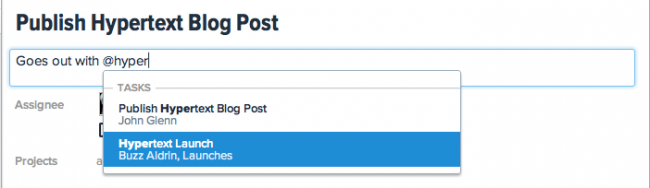
Linking from one Task another is a great way to highlight related Tasks, point out dependencies, close out duplicates and link follow-up Tasks back to richer sources of information. You could, for example, capture a customer interview in the notes of one Task and link future tasks back to the that interview. You could link a feature you’re working on back to the customer request that inspired it. You could link a task to publish a blog post announcing a feature to the task to launch the feature, as seen here:
Linking to Projects
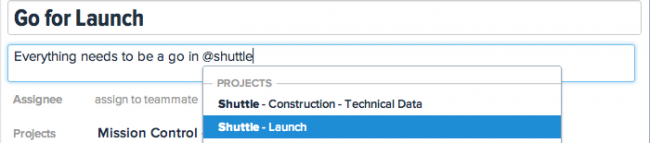
Linking from a Task to a Project is a great way to connect a high-level task to the Project that contains the execution details. This is great for sprint planning. You can also link Tasks to Projects to highlight dependencies between them.
Linking to People
Linking to a Person from a comment is the fastest way to bring him or her into the loop. You can also use links to People to direct comments:

Hypertext’s Future
The introduction of Hypertext is just the beginning. In the future, you’ll be able to view all of the Tasks that link to the current Task, enabling you to see dependencies, duplicates, and related Tasks at a glance. Hypertext will enable your team to represent and navigate the relationships between Tasks, Projects, People, and ideas in ways that haven’t been possible before. Ultimately, you’ll achieve your goals more quickly, and be even more empowered to do great things.
Thank you for this! Now I can keep my internal links within a single browser window, and it’s easy to spoof subtasks while waiting for a more integrated solution.
Cheers! :)
Nice. Keep up the good work, and read my suggests on Dave Enjoys. ;)
Hey guys, great new feature. Just thought I’d point out here that the RSS feed doesn’t have a name/title. When I added the feed to Reeder for Mac, it pulls in the feed fine but does not display the name of the feed, i.e. Asana Blog
I love that you guys are continuously thinking “How can we make this even better.” It’s really inspiring to see such a project blossom, especially since I was here since the beta period.
Very nice feature. Can’t wait to see how it works at a ‘glance’
Awesome! How about using current task number to link to that task? IE @123 translates to the current task numbered 123 (and still maintain this link even if the number changes). That would be much faster than searching by name
Is this currently live already for all or will be rolled out? As it doesn’t seem to work for me at the moment?
Also now that this is done, any news on the iPhone Mobile App update, subtasks feature and coloured labels?
Opher, clever suggestion! We will consider that in the future.
Mohammed, it should be rolled out for everyone already however you may need to reload your browser to get the latest version of the code. If that doesn’t work, please write to support@asana.com and we’ll help you figure out what’s wrong.
This is a game changer feature! Asana is already fast and this will make it even better.
Wow…This is so much better than having to copy / paste URL’s to link dependencies.
Love this, thanks guys!
Wow, it’s like you read my mind or something: just before I saw the strip at the top of the page that called this feature out, I was poking around for a “permalink” to an individual task. I have now found it. Thanks for continuing to innovate!
Hypertexting to create traditional links out to external web apps and sites would be useful. Imagine if your team were collaborating on Google docs in a Google drive. It would simplify the sign-in process….. I’d be the first to use it!
Thanks for this new feature!
How do I escape the “@” character? I cannot enter a complete email address now.
Very nice feature. Seems like the developers take in feature requests seriously :) Kudos!
Awesome I Love it!
Awesome idea! Can’t wait to start using it!
nice work!
Great idea and I love it.
My only recommendation would to be to have it auto complete with a tab. Right now you have to hit “enter” to do this which makes me think of accidentally submitting a comment before I’ve completed it.
Seeing how tab is used a lot throughout the app, this seems like a good spot for it as well.
Example:
Going out with @Ann (auto completes and @ links Anne Hathaway) tonight to show off Asana! (to submit comment)
Last comment didn’t accept my key enters.
Example:
Going out with @Ann (Hit tab key. Auto completes and @ links Anne Hathaway) tonight to show off Asana! (Hit enter key. to submit comment)
Shannon, we agree that would be awesome. That’s definitely something we’re considering.
Colin, I’m sorry your having trouble typing emails. The hypertext feature is only supposed to activate if you type an ‘@’ that is not preceded by a space. We did this to make typing emails easier. Could you please let me know which browser your using if that is not the case?
You can hit escape on your keyboard to exit the hypertext dropdown and keep typing as normal.
Branden, I’ll add a task to look into auto-completing on tab in addition to enter to our Asana project for hypertext.
It doesn’t work for me. I tried with names an tasks, but nothing happens… I tried Google Chrome and Firefox.
Nice Idea, but It bothers me a bit, that the @ is removed. Mainly we use @Paul to ask a question in a status update (@Paul: Can you check please?) – without the @ “Paul” is just a link and you don’t know if it is referring to Paul or asking a question.
But this is minor. Keep up!
Great! :)
Nothing happens for me on Chrome not sure if this is rolled out to everyone or just stopped working after a day ( see another comment above me saying not working on the 8th )
Awesome !!!
This only seems to work with a US keyboard layout in Windows – ie with it set to EN-US, shift-2 then gives a hint that hyperlinks are available; with the layout set to EN-UK, the @ is shift-’ (apostrophe) and nothing happens.
Disappointing that this means faffing about with the language bar and remembering where the @ is on a US keyboard.
Works like a charm – I just spent a few minutes looking for a task earlier while on a call, now I can link to it for all users to see. Fantastic ! Thanks a lot guys !
Now, let’s have that multi-ownership feature for tasks and I’ll be as happy as an Asanian can get :)
It doesn’t work
Doesn’t work for me either (using European keyboard)
Great work !!
Lovely, thank you so much Asana:
Excellent feature, but sadly not working for me either. I’m using latest versions of Chrome and Firefox. UK Keyboard layout. Also tried cleared my cache.
Excellent addition and working fine here on my Swiss German keyboard on the current chrome version.
What could be enhanced is the turnaround time cause the refreshing of the list or the box showing up at all take a fair amount of time despite this being a Core i7 2011MBP
Not working for me either (using European keyboard).
Sounds exciting and helpful, but isn’t working for me either (UK keyboard)
Doesn’t work for me either in the UK, after refreshing, logging out and closing down my Chrome browser. Sad face :(
I guess this doesn’t work when trying to link to other work spaces?
I don’t know if anyone else made this suggestion, but when you click through to a linked task, it would be nice to see in that task if anything linked to it, to get the full context. for example, Task 1 links to Task 3. When I arrive at Task 3, it would be nice to see the inbound link from Task 1 (tasks/objects are “link aware” somehow)
Brilliant………. such a feature was very much needed
awesome ! thank you…
Very kewl!!
Love this!!! Great to see Asana getting these bonus feature that make it that much better!
Suggestion: allow us to delete users last name in an “@” tag.
Such a surprising feature. I didn’t even realize how useful this would be.
Flawless! Thanks and keep it up upgrading!
Great feature. Right now I place links to a related tasks in comments, where they are converted into clickable task name. Would these links also be included in upcoming feature, that would list all tasks, that reference this one and via-versa?
Perfect! Asana really understands and implements what we need. Thanks!
Awesome! I’ve been waiting for this feature.
doesnt work at all on my systems – tried in current Chrome and Firefox
Its really helpful. Now I don’t have to copy paste the URL of tasks when referencing.
Keep up the good work guys!
THIS IS MIND BLOWING!!!
Great feature! lovin it.
Fantastic! I’ve been looking forward to something like this. I can set commonalities and dependencies **without depending on a rigid structure**
Love it.
Great feature!
But I do have to report that on a Mac running Chrome 21 with German keyboard it doesn’t (yet) work.
What @shannon said. And hyperlink to Google mail please!
Kris:
Thanks, what I wanted to enter is something like *@gmail.com. It enables hyper-text. I tried the Esc key and it works great!
This sounds like an awesome idea. Can’t wait to try it out. Big thanks to you guys!
Great feature, works superbly
For all of you having issues with non US keyboard layouts, we apologize for the inconvenience. We will look into making this a smoother experience for you as soon as possible.
Very clever – its like a reversal of Facebook putting the task rather than the person at the center of the activity universe.
Nice feature. How about ability to connect with a repository? Link a task to a commit?
It seems not support the Chinese input.
I really appreciate how you guys have continuously evolved things. You can tell there is a mentality of continuous deployment with little changes and always looking to bring in new features. Thanks
please consider supporting Japanese language :)
it seems not work on a German keyboard
How does this work if you are contributing to a conversation via email? I’m guessing it’s not possible to make these links, which would be a big shame, as in most of my projects 90% of the comments come from email.
NOT WORKING!
Using German-Keyboard and Chrome latest version…
Nevertheless thanks for this wonderful tool!!! Keep up that awesome work!
Thank You!
Great. It’s exactly what I was waiting for :)
Thanks!
Tom, if your contributing via email you can still include links to projects, tasks, people, etc and they will be turned into the actually names of the objects when viewed in Asana. In fact, you can also enter asana links inside asana and they will be converted to the name of the object as soon as your cursor moves away.
+1 on doesn’t work (Norwegian keyboard)
;)
very usefull feature.. great work
Kris,
Its already great, but just my 2 cents…
1. Editable Comments. I believe we can just delete posted comments right.
2. Rich Text Editor for Comments Box.
I dont know if I am using it the right way, but we tend to use the comments box for Notes related to the task. And it helps to have a Rich Text Editor.
It works on my Norwegian keyboard: both in Firefox and Chrome.
Very Useful Feature…
Great!!!
Next step if possible, display a completed task differently from others (strike-through, gray, green,italic) just show-off somehow.
Would be so awesome solution for sub-task-like solution
If you add a file, say an image to a task, and then have lots of comments back and forth, but you want to reference the image at one stage,
Wouldnt it be a good idea to allow @image to refernce the uploaded file?
Thank you!! Thank you!! Thank you!!
So easy to use, just like the rest of ASANA. Great job.
Swiss-French keyboard: does not work (Chrome).
Now get make an android app and this would be THE best. (The HTML5 is nice, but doesn’t cut it…too slow…has to download each item every time.)
Is a fix for non-US keyboards on the way?
very helpful feature
What can I say. Wish you more success. Thanks.
This is an excellent aid for my company. Thanks guys. I love the intellisense speed and intuitiveness.
How to restrict the assignee from deleting the tasks assigned to him
Awesome stuff, love it.
Does not work (yet?) for me with current firefox on win7, is it already live?
Doesn’t work for me either (using latinoamerican keyboard).
File sharing . . . I’d LOVE to see this tied in with box.net or dropbox teams so I can share files in Asana tasks with team members.
Awesome stuff!
Awesome. I’d love to have this feature.
Julian
http://SlideOnline.com
Just saw that you guys pushed another build (had to reload) but wanted to let you know that the new @ feature is still not working with German keyboards.
I will keep on trying each morning… ;-)
Not working either on French Keyboard.
One week to implement arobases, it begins to be really long…
Great! Asana is awesome, I’m now using it to plan and track the development of my soon-in-beta new text editor (http://liveditor.com, with a Firebug-like UI for tweaking css/html/js in realtime).
Great! But there are two additional things in Asana that have to be connected. I mean comments and files.
This is useful, but I sure wish you’d fix the problem of a consolidated task list across workspaces. People that work on multiple teams needs this to make the product efficient to manage their work.
Definitely something we’re working on!
Didn’t work for me… I cleared the cache but I don’t have anything when I hit the @ and then some letters…
What should be done to get this functionnality ?
ps : another great functionnality should be to set a percentage of completeness f the task with the keyboard such as typing @50% , or @+10% ;-)
I read in the comments that they may be some troubles with french keyboards… it is my case, also… so perhaps is the @ not correctly detected ??
We are working on a solution for european keyboards now. Sorry for the wait!
fubles.com’s workaround is working fine
“I’ve found a workaround that could/should work for every european layout (tested under windows/italian layout): type the ‘@’ sign then press alt-2″
i can confirm that this works using a UK layout : )
Great Feature !
Keep up the good work.
Thanks,
Once again, a lovely feature that makes a post-email reality closer by the day. This is a wonderfully flexible and powerful addition to Asana. Keep it up!
Not working for me in Germany either….
very awesome new feature. One suggestion for a small improvement: being able to link to task or project attachments within the comments “Hey Kris, check out this document here @LinkToFile.” That’d be extra awesome
Hello guys,
I’m trying to convice my organisation to switch to Asana as soon as possible, it’s a great tool so far!
As others did before, i’ll point out just 2 issues :
- the links doesnt work on french keyboards (but i just read you’re working on it, thanks!)
- As I followed your (very interesting) CRM tutorial, i would definitely need to link my CRM database/workspace (1 project/people) to the tasks workspace. That would just save us an incredible amount of time.
When do you think those features would be available? So i know if i have to find another solution for now, or should i wait a little bit ?
Ok this STILL does not work in the UK using a UK keyboard layout, if I mash a bunch of “” @@ “@ randomly it does appear bu in a none functional kind of way
I’ve found a workaround that could/should work for every european layout (tested under windows/italian layout): type the ‘@’ sign then press alt-2. The hypertext searcher should now appear.
Yes! It works!
Great workaround – thanks fubles :)
Awesome, can confirm that this also works on a UK Mac keyboard (running Windows) as well! Thanks for sharing!
I would suggest you use the ~ (tilde) charachter to trigger this feature rather than the @ charachter. The @charachter is in many email addresses and is also used commonly for things like 10.5 gallons @ 3.59 a gallon.
This would make this awesome new feature even more awesomer.
Thanks so much for this site you all “get” it
Thanks fubles! it works fine.on a german keyboard.
This is a great tool.
thanks to fubles, too! better than switching to us and back again.
but still too much typing to get a working link. shouldn’t be that difficult to implement that, is it?!?
bahut sahi…Neeta ji ekdam sahi baat kahi… aur ekdam sahi mudda uthaya… ajaakal is net ke chakkar mei to pata nahi sabhi ko kya ho gaya hai…n specially females ka to aise logon se yunhi pala padta rahta hai…
Does not work for me SRWIron (Chrome) browser, German keyboard. No completion comes up.
Yes, doesn’t work with chrome or Firefox on Mac!
It is clear that it does not work with non-US keyboards. When will solve?
Still nothing with Chrome 21 (Mac) and a German keyboard.
Any indication when this will work for us “non-US” keyboard users?
This is an interesting extension and reminiscent of Lotus Agenda (vintage groupware). Agenda had the concept of “Views” where every item which was tagged with designated keywords appeared. The powerful thing was that, if you changed the designated keywords, Agenda would “re-scan” the entire object space to rebuild all the views. This meant that you didn’t have to know all the possible tags you might one day want to use in advance. I’d be happy to talk to you about this if you like…
Hypertext should now work when you type the “@” symbol on all keyboard layouts. Please let us know if you continue to have any issues!
There are some keyboard layouts that do not have the “@” symbol. For those, you will need to switch to a layout that does have the symbol and then switch back.
is the lunascript open source ??
available for others ?
It’s not working for me on an Italian keyboard :\, that’s an awesome feature I want it!
Are the links in comments supposed to remain as actually links. I always find that after picking a person, the link disappears and the text becomes normal, unclickable text.
Ah, it seems to work in Safari 6, but not Chrome 24 on OS 10.7.5.
Still not working in Chrome. Using a US keyboard on a MacBook. Won’t work! Help?
“@” Hypertext still doesn’t work on Italian Keyboard
Thanks
not working for me, chrome/ubuntu on italian keyboard. :<