Our Product Priorities for Episode 7

avatar

by Dustin Moskovitz
February 5th, 2013

Asana Product Priorities Episode 7

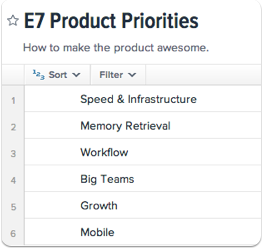
At Asana, we’re currently gearing up to begin a new episode of work. Episode 6 was one of the most productive periods in the company’s history (summary coming soon!) and we’re excited to do even more in the next one. Our small, but growing product development team is focusing on these high level priorities to improve the service.

Speed & Infrastructure

stability > speed > features

Our most important design goal is to make sure you have access to your data when you need it. We don’t have a perfect uptime record, but we’re constantly improving. As we grow, we need to regularly redesign parts of our architecture to scale with the user base and ensure that we continue to deliver a great experience for everyone.

We have also always had the belief that interaction speed is critical to the success of the product. Our framework, Luna, enables our developers to write an incredibly responsive application, one that feels more like desktop software than a web page. Most things you do in Asana happen instantly. This team is chartered with eliminating the ‘most’.

Memory Retrieval

Asana is the collective memory of your organization. Our most successful customers put everything they can into the system. More than one has told us “if it isn’t in Asana, it doesn’t get done.” We can achieve this outcome for everyone only if they have confidence that they will be able to find their tasks again when they want them, and that they will be surfaced automatically in the right contexts. This is particularly important in the context of Bug Tracking, a use case that is very important to many of our early teams at software and web companies. We’ve heard clearly from customers that they need better ways to track and manage large collections of defects and ensure they are solving the most important problems. Our E7 work will enable you to search, filter, and sort your data in new ways that guarantee you always find the tasks you want.

Workflow

Asana is currently optimized for tasks with two states: incomplete and complete. There are many “work items”, however, that actually advance through many stages as part of a pipeline workflow. An applicant advances from uncontacted to contacted to phone screened, etc. A bug advances from reported to ‘fixed in the code’ to ‘fixed in production’ to verified. This program is responsible for making those workflows obvious to your team, so that you don’t have to rely on conventions to manifest them.

Big Teams

Asana is used by tens of thousands of small teams, and many larger ones. However, the organizational demands of larger groups are more sophisticated: additional layers of information hierarchy are needed, especially in the context of how people are broken up into teams. Those teams need to have effective and powerful internal communication that lives next to their work and be empowered to easily and centrally administer their workspace. Some of these improvements were actually begun in E6, and we’re excited to launch the first pieces soon.

Growth

The real question is not “How do we increase our user count?” — that is how we measure our success. The real questions are “What’s getting in this user’s way? This team’s way? How can we serve them better and make them fall in love with a product that effortlessly solves their needs? How do we make them so delighted that they tell their friends?” This team will identify the roadblocks at each step of the funnel to people who could benefit from Asana actually benefitting from Asana and either knock them down themselves or recommend the creation of new teams to do so.

Mobile

In the last episode, we made some major improvements to our highly-rated iOS app. We also started development on our first version for Android, which you’ll be seeing very soon. In Episode 7, we’ll continue iterating to make these experiences even better, including the implementation of most of the product improvements mentioned above. The new Asana mobile experience will be faster and more powerful than what you have in your hands today.

Feedback?

This is how we see our world right now. We are always on the lookout for new information, however, and intend to continue evolving the plan as we learn more from customers (and there is also, of course, a brand new episode starting in June). Do you have anything to tell us? Write in to feedback@asana.com or post a comment below.


128 Comments

  1. avatar Reign Johnson says:

    Thanks for all you hard work and for an amazing product I use every day!

  2. avatar Jarrod Kopp says:

    I can’t wait to see what you have in store for mobile.

  3. avatar Emilio Cecconi says:

    Great work so far. I’m especially looking forward to the new Memory Retrieval feature. I have been using Asana every day for over a year. It’s really streamlined the way I do my work. It made me rethink how I did things to work within Asana’s framework. That framework is really good.

  4. avatar Justin Baird says:

    Nice! when is episode 7 expected to go live?

    • avatar Dustin Moskovitz says:

      We have already begun this work and will be finishing it up in May. Notably some things tend to launch a little after the end of the episode, since we often do beta testing before a full release of new functionality.

      • avatar Trajko says:

        I’ve been closely following everything you’re doing for almost a year now and your level of productivity and performance never ceases to amaze me. I’m curious though, during “off-focus” work, are you finding yourself still, at least, taking down notes about the “focus-time” and jotting down notes and thinking about (subconsciously maybe) the “Episode work” itself, or you’re completely forgetting about it?

  5. avatar Aaron Klein says:

    A big problem I hope you solve in E7′s mobile area is iPad compatibility. Asana’s mobile web app isn’t full featured enough, the full web app will not load in the mobile browser, and the iPhone app just doesn’t work on iPad.

    There are 100+ million iPads out there, and many of us are using them as a primary computing device. We need iPad compatibility and soon.

    • avatar Dustin Moskovitz says:

      Thanks for the feedback, Aaron. Things will get somewhat better for iPad users in E7 and a lot better later in the year. Which of the currently missing features are most important for you?

      • avatar Scott says:

        I can’t speak for Aaron but for now, I would be happy if the iPad version was the same as iPhone. Editing detail/notes is really important for iPad. Subtasks (adding&editing) are extremely important for both.

        Essentially bringing the iPad out of webapp and into a real app would be extremely helpful to our workflow. I would actually prefer that the iPad app catch up to the iPhone and only then begin on improving them both at the same time with the same new features… But that is just how I feel.

        Keep up the great work and thanks for actually listening to your users!!

        • avatar Jonah says:

          +1 Vote for iPhones ability to add&edit subtasks. We use a task like a project, embedding subtasks, and we use projects as a folder to house the month’s projects.

      • avatar Mike Korner says:

        I’m not Aaron either but I would prefer the iPad version to be more like the web version instead of the iPhone version. Why?

        When I’m on the iPhone, I miss having the context information (what project is this task for) and the project navigators on the left. In some cases I have to name tasks with the project name so I can tell what project the task belongs to.

        For example: On the web, a task like “Review Outstanding Bugs” works fine because I can tell what project it belongs to. But it’s a pain on the phone because I can’t tell which project the task belongs to. So I end up with Review Bugs for Project 1.

        • avatar Schalk says:

          I fully agree. I need to have the iPad version do all the same functions. The fact that I cannot access sub-tasks has actually caused me not to use the app.

          Nowadays being able to use these functions in a mobile way is not optional anymore. I sit in regular client meetings – anywhere (their office, my office, coffee shop) and I need to be able on my iPad to already create tasks for staff to start with, even while I am travelling (I would use sub-tasks for this)

        • avatar Adam says:

          I agree with mike above. We NEED the left sidebar in the mobile app so we know what project the task is associate to. Please at least offer this change and we can wait patiently for an iPad version.

      • avatar Jeremy Pemberton says:

        Creating or Editing Due Dates, please!

        As a project manager, I need to be able to assign tasks with deadlines on the go. Because I can’t create a new task with all vital details (due dates, tags, multiple projects, and context), I end up not using mobile at all to avoid fragmented management or duplicate efforts when adding those components at the desktop later.

        You guys are doing great things with Asana! Stoked for the upcoming Workflow features! Thanks!

      • avatar Phil says:

        I have been looking for the killer task management application for some time and thought I had found it today when I started using Asana. The full browser base version is fantastic! Then I trialled the ipad app and mobile version, and the full browser version on chrome. Sadly I have to say I will continue looking I only use a desktop when sitting at my desk at work which is about 10% of the time.

        It is hard to say which are the key features that I would like on mobile. All of them would be good. Adding sub tasks is key.

      • avatar Phil Palmieri says:

        Hi Dustin, I think I’m just restating what others have said. But, I think a lot of these issues could be solved by just not forcing the mobile version on tablets. They are more than capable of running the desktop version – and even if its a little buggy, let me choose it… It’s a pet pieve when sites force the mobile version through… Technically even an iPhone with retina could render the main site properly. And, in chrome – the request desktop version doesn’t work

    • avatar Mihai Crasneanu says:

      Aaron, a quick tip that might help you with your iPad and Asana. If you launch Asana website from Safari, it will bring you up the mobile version, which is indeed quite limited.

      Install Chrome on your iPad, launch the Asana website, and then press the menu button (the 3 horizontal bars next to the search bar) and select ‘Request Desktop Site’. It will bring you the full Asana website, the same you get on your laptop. It’s not as fluid though, but you have all the features.

      youtube to mp3

    • avatar Ray Hoskins says:

      I work with Asana on my IPad frequently. I use the App sometimes, but i usually use Chrome on the IPad and find it a seamless experience.

    • avatar Manuel Funcia says:

      Hello. The Puffin App will access the full web features of asana. In my case I use the Asana App and If Im away from my PC and needed to access some special feature I would do it in Puffin.

  6. avatar David says:

    Love it. I think time tracking would be a killer feature.

  7. avatar Dave Mackey says:

    I love Asana, but a couple thoughts:
    1. It is still far from desktop-application responsiveness. I’d recommend creating a Windows desktop app. One quick and easy way would be to modify AbstractSpoon’s open source ToDoList application.
    2. Android app sounds cool…but how about integrating with a task management app. that is already feature-filled? I’ve recently really liked Astrid.
    3. Consider dividing development into two teams – even if one team is very small. A lot of the changes you are making are great and all, but definitely focused on the enterprise. Don’t forget us individuals, small groups, and small/medium businesses!
    4. I’d still really like to be able to use Asana as a helpdesk. For this to happen I’d need for people to be able to send an email to a unique address (e.g. daves-tech@x.asana.com) which would create a ticket for them, without them needing a user account.
    Keep up the great work!

    • avatar Adam Clampet says:

      If you are using a WordPress Website you can use Asana as a helpdesk. I bet the code for the plugin could easily be modified to whatever your using.

  8. avatar Jay says:

    things i’m Excited for in E7:
    -Better search – need this desperately.
    -Better mobile – I really need to be able to everything in asana on ipad.

  9. avatar Tyler Tringas says:

    As you focus on mobile, just as food for thought , you might consider faster and LESS powerful. I think most users will only want to do a small subset of Asana features in mobile like adding new tasks and checking off existing ones. Most of the management and organization is probably better suites to desktop work. I never use Asana mobile b/c all I want todo is get new task out of my brain and into asana really fast (per GTD) so I just use a hack of Captio + adding tasks via email. Anyway, keep up the great work.

  10. avatar Jorge Gamito says:

    Please launch a full featured android app or at least something like de ipad/iphone has (I also don’t like that app, I prefer the web version).

    Thanks and keep the good work.

    • avatar Nick Trabue says:

      It’s not official but there is a great little app called MyAsana that I honestly prefer to the iPhone version. It’s a great App.

  11. avatar Ivan Kristianto says:

    I’m very excited to hear a good news for the Asana mobile for Android. Go go go Asana! We Love You!

  12. avatar Bicienzo says:

    I believe a native iOS app is the ONLY weak point in Asana.

    • avatar Andrew says:

      I agree with comments about simplicity…a danger is that Asana gets too far ahead of users/culture. I don’t envy you those debates…

      However, a mobile (offline) app (I’d take iPhone to start) is crucial. The mobile experience is way too slow…it needs to be a quick-add and quick-sort/prioritize your day user experience. It isn’t. So all those small moments – on the train, in line somewhere – are lost to Asana. Offline would seem to be the only way to do this speedily. And not having Asana on planes is an absolute killer – it’s a great place to organize and review…again, lost to Asana users.

      I’d really like to see a blog post on this topic. Every task app on the planet has iOS apps. Few of them have $38m or your talent…so what is the holdup? Maybe if I knew more about the larger strategy I’d be more patient…

      • avatar Papernoise says:

        Second that. The current status of the Asana iPhone app is a bit of a let-down. Even on my last gen iPhone 5 the app is pretty slow sometimes, sometimes has difficulties connecting to the servers and worst of it all does not work offline.

        Also it lacks some kind of task inbox, because when you’re running from one thing to the other you just want to note down a task without having to change to the correct workspace (which can take ages right now).

      • avatar Rob says:

        I agree, there are so many blind spots with poor connectivity, and by its very nature Asana needs to be always on to be the hub of your organisation. People have been asking for offline for 3 years now. My company stopped using Asana becasue ti does not have it. I came back to check on progress, but STILL no mention of addressing this?

    • avatar Jared says:

      I agree that the biggest let down for me is the non-native app. A web app is useless if you don’t have the net and need to plan!!! I’m stuck moving between omnifocus & asana and its really a big pain! A dedicated app is crucial for OSX / WIN / iOS & Android!!!

    • avatar Dom Corriveau says:

      Agreed – offline functionality and response time are critical for the mobile app.

  13. avatar Bennett says:

    +1 ipad more like web than iphone
    +1 better search

    but above all the biggest stumbling block for me is the inability to nest projects in the left-hand toolbar. Feels like this should be simple and it would revolutionize the way I work.

    Keep up the great work!

  14. avatar murat hazer says:

    Congrats for such a great application, thanks for all your effort

  15. avatar Francesco Ambrosini says:

    I work outside for the major part of my work-time. Until there isn’t a functional android app i can’t start work seriously with asana.
    And i would love so much.
    Thank you,

    Francesco A.

  16. avatar Stephanie Leary says:

    I’d love to see a very (VERY) simple time projection tool for projects: start date, estimated time or end date, and a way to see all those estimates in a linear calendar view.

    Right now, I’m using the [n] suffix on my project names to store my estimated hours, but I don’t have a good way to visualize them all together.

  17. avatar Andy says:

    I love Asana so far. Feature requests for the next version:-
    1. Unified view of all open tasks – for project reviews – across all workspaces, and all users.
    2. Search notes. Make notes that are not task related (could be tagged) – want to register info about contacts for CRM, or about organisations.
    3. Better still, have a specific type of tag or item relating to contacts – maybe there could be a few different versions of these so that users who wanted to do different things with Asana (eg bug tracking) could turn these off but turn on relevant ones for their use case (eg defects).
    4. Mobile / iPhone – iPad to have either full desktop option, or much fuller featured and in line with iPhone. Ability to create subtasks, view ‘later’ items, change prioirity, basically do everything. I only use desktop when I have to. Please also create an Android app for those users so I don’t have to read +1 for Android all over forums any more ;-)

    Overall most excited about the workflow, mobile and memory topics – sounds like you’re on the right track.

    Thanks again for a wonderful product.

  18. avatar Trevin Chow says:

    We use Asana for bug tracking and all our user stories, so we are particularly giddy with excitement over improvements in workflow!

  19. avatar Briar says:

    So, by workflow, you mean I’ll be able to categorize an item as “in progress?”

    Still waiting on Stars or some other form of prioritization, too.

    Thanks, guys! Couldn’t live without Asana!!!

    • avatar Dan Kaplan says:

      Have you seen hearts? We just launched it.

    • avatar Dan Nolan says:

      Hey Briar –

      I’ve just started storypointing my tasks with Tags. Then I can sort by tags and build out list by day of what I’m going to focus on that day, in accordance to how much time I have that day.

      My tags:
      1 Point
      2 Points
      4 Points
      8 Points (clearly a more complex task/project and full of subtasks)

      New approach to me, but in theory I think it should work out well.

  20. avatar Thomas says:

    How about Internet Explorer support? The darn website is BLOCKED on IE. Means I cannot use asana on my Surface RT at all! How can a service not run in any browser nowadays?

    Would like to live with asana!!! But can’t!!!

    • avatar rasadada says:

      Has anyone found a hack for this. Why can’t Asana work on IE10. If this is a settings issue, please advise Asana. You are working to be a corporate solution, and as you are well aware- Microsoft rules our PC’s.

  21. avatar Zander says:

    Would be very helpful to have some tutorials or instructions on how to use asana really well. I’m sure there are best practices. Would be great to see them.

  22. avatar April says:

    We recently started using ASANA and totally love it so far. Really the only thing we would like is to be able to set not only a due date but a time as many of our tasks are meetings and have a specific time.

  23. avatar max hodges says:

    LUNA link in the article is broken

  24. avatar Johann says:

    Urgently need better search. Currently, can only search names of tasks/projects. But that requires *remembering* the name of a task/project! What we need is full-text search of all notes, comments, attachments, etc.—all text fields. It’s often frustrating and wastes time when you can’t find something in Asana, because there is no full-text search, and you can’t remember where it was “filed”.

  25. avatar Mike says:

    I would love a simple point weighting system for tasks. Nothing too complex — maybe just marking off a point value for individual tasks and the ability to view how many points are assigned to a given person. It would make your tool a lot more useful for those who work in agile development!

  26. avatar Dan trotter says:

    I love asana! It was suggested to me months and I’m wishing I’d checked it out then…..fantastically easy to use!
    Would love to see these features:
    1. Drag & drop attachments – with Dropbox as a folder on your computer, you get used to having folders open, working on files. Then to drag them in rather than navigating through many sub folders to the file you want would be really good!
    2. Time tracking – a start/stop timer or autonatic time taken – so time spent on each task is tracked. Easy to run reports adding time spent per project per week would then be essential. I use asana with 4 employees and need to see how long they are each and collaboratly spending on each project.
    3. Better email notifications – quickly identifying by part of the subject line whether the task is now assigned to you (action when next in queue – could be days) or just a comment (question) has been added which needs a faster response. Maybe importance level in email subject would help.
    Can’t wait to see all the new developments!

  27. avatar lemi says:

    long time user first time caller,

    please make the iPad app at least as comprehensive as the iPod, i can’t even allocate due date!

    In relation to the status you mentioned of limited to Complete and Incomplete, we have had to tag alternative status such as awaiting response from, and awaiting response to, however this is cumbersome, if there was a field of status one could add on as required in addition to Complete and incomplete, that would be effective. In our case described above there would be 4 ‘buttons’ (forgive the terms used) Complete/Incomplete/Awaiting Response From/Awaiting Response

  28. avatar Nick I says:

    If you can now integrate Asana with Mailbox, there won’t be an equal product.

  29. avatar Scott Daly says:

    Dustin, I urge you to reconsider this hearts “enhancement” that Asana launched today.

    We are a professional services organization, as are all our clients. We view Asana as a clean and intuitive task management/collaboration tool. And like many of your customers, we’re Asana evangelists.

    This hearts thing might seem like a minor thing to you. But for us, you’ve suddenly turned your amazing app into Facebook for Teams. I don’t know about your other customers, but no one in our team needs this kind of positive reinforcement. It’s frankly a turn-off and further clutters an interface that becomes more and more busy with every improvement you make.

    I would feel differently if this was a minor issue. But here I am looking at a typical screen and count ten hearts.

    I think this is a big mistake.

    • avatar Chris says:

      +1
      You are risking acceptance by the wider business community. ‘Hearts’ needs to be replaced with something more business-like.

    • avatar Schalk says:

      I am glad you mentioned this – for me it was also totally off-putting, and I was starting to wonder who the target market is. Personally I would be glad if it disappears, or one can switch it off.

  30. avatar Christy says:

    I’m a Graphic Designer at a small creative firm & It’s been about 6 months since we started using Asana. Asana has improved our company so much & we definitely appreciate this software supporting small companies. The only suggestion I have that would significantly improve my workflow would be changing how Asana reminds/notifies users that a project/task has been altered in any way. I have my email notifications turned off because I check my Asana often during the day. However, instead of me double checking each of my existing projects to make sure a due date hasn’t changed, I’d like to see a notification (similar to Facebook notifications) that a task has been edited by someone else, alerting me to check on it in a subtle way. This would drastically improve Asana I think & simply add one more thing that is amazing about it.

    PS: I hope that the heart feature recently added was maybe just for Valentine’s… I too feel (like Scott Daly) that a heart has an odd connotation that may be inappropriate at some workplaces. I wouldn’t use it & I work at one of the most laid back companies there is…but this is a very trivial issue.

  31. avatar Tess says:

    Yes! I love Asana and use it every day in two different jobs. I was the one tasked to find a task management system for job #1 and my boss and co-workers love it. We’re an accounting group who also prepares taxes and it’s helping us immensely, as we keep track of clients and the various associated tasks. I’ve earned “points” for finding Asana, and the title of “Asana Queen”! Thank you so much for all of your hard work. I look forward to the updates and love the hearts!

  32. avatar Nick Bonich says:

    Great news – keep up the good work!

    Also – please keep Asana lean and simple. I see a lot of requests for time tracking, resource planning, etc. Asana is great because it does one thing very well – please keep to the ‘email killing’ philosophy that drives it – and nothing else.

    Key priorities for us to drive additional adoption/usage are:
    * iPad app – seems the natural platform for this product
    * Ability to sort on mobile (across all versions)
    * Move between workspaces – ability to see all tasks across all workspaces + move tasks between them.

    That’s about it – 99.9% perfect just the way it is! Don’t go changing too much, it’s the simplicity that drives our efficiency on this platform.

  33. avatar Mike Dalisay says:

    Can’t wait for the Android App.. Hehe.. I hope I still can see my tasks even offline. :D

  34. avatar Sarah says:

    We have been suggesting your product to all of our clients. We just can’t say enough about it. It has saved our sanity (and maybe even our marriage and business relationship on some days). I can’t wait to see what else you have up your sleeves!

  35. avatar Joe says:

    +1 for workflow! I really need it

  36. avatar Taras says:

    We have been using Asana for about 2 months. We like it for it simplicity (have used Jira before). Please keep it simple. Your focus on big teams is what scares me. You can’t build one software that will be just right for both small and big teams, which Asana is now for smaller teams. Dustin, you’re doing quite complex development, does your team use Asana for Asana development? What have you used before the Asana went live?

  37. avatar Marcos Sader says:

    Hey! Any plans to translate Asana? I’d be willing to contribute trough some sort of Twitter Translation Center.

  38. avatar Jerome says:

    I would LOVE to see a way to apply the same task to multiple PEOPLE. ie if i want my whole team to read the same book then I can make one task and assign to them all.

  39. avatar Austin says:

    Can we please get more hierarchy inside of task and projects, all I really need is the ability to be able to make a Parent Project and have an unlimited number of projects inside of it. Also allow users to Tag a project so that it tags all of the tasks at the same time.

  40. avatar Leonardo Dario Perna says:

    @tags for non-US keywords would be incredibly appreciated.
    — a non-US user :)

  41. avatar Dada Nabhaniilananda says:

    Asana has taken over my life, and that of the many friends I’ve introduced it to. I am an Asana Evangelical. I discovered it when I saw you speak at Wisdom 2.0 last year – we chatted afterwards – you may remember me – the monk dressed in orange. I’ll probably see you there again next week. Congratulations on a brilliant, intuitive product, and thanks for creating such a generous free version. Outstanding.

  42. avatar Tim Davis says:

    Here’s a thought: Allow users to create project templates and use them when creating a new project.

    Something like this would be useful for someone in a QA role where consistency in process is very important. It would function essentially like a checklist but allow for interactions between QA and development or between QA and production.

  43. avatar Marty says:

    I still would love to see a mechanism to control how much screen real estate is devoted to the task details pane (i.e., the right-hand pane). Currently the only options are: 1) it occupies 0% of the browser window (i.e., completely hidden), or 2) roughly 35% of the window. Ideally, there would be a draggable boundary between the task list pane and the task details pain. Another alternative would be to provide a button to completely hide the task list pane, letting the task details pane occupy all of the area it shares with the task list pane. Since people are starting to put “everything in Asana,” I think this would be a real boon to usability. If the “devil is in the details,” then let the devil be fully shown!

  44. avatar Chris says:

    I use Asana for a couple of small teams (3 or 4 people), but I can’t encourage others in the wider project team (100 + people) to use it, because it lacks two key elements;-

    1) A Report Writer ( Executive Managers need project status output which doesn’t require them to log in and trawl through. Software developers love to log in – Construction Managers won’t )

    2) Disaster Recovery capability (Project/Program Directors dismiss systems that don’t have a back-up stored somewhere under their control – growing reliance on Asana without DR capability becomes a risk that most won’t tolerate)

    • avatar John Hile says:

      I agree. We really need some way of downloading a backup that would be usable in an emergency (XML, JSON, even just structured text). Being able to store a separate backup is usually a requirement for us for using web apps. We’re adopting Asana anyway and it is working well but we’ll remain prone to jumping ship unless we can double-backup. Even gmail had a scare a year or so ago, whereupon we started using backupify.

  45. avatar Alex says:

    Official talk of an Android app! :D

  46. avatar Ben says:

    I agree with Thomas. Please make Asana able to function on IE, so that I can use it on Microsoft Surface RT, or create a workaround.
    If not, I may be forced to switch to another task management/collaboration solution.

  47. avatar Andrea Maschio says:

    Time tracking is really missing if you want your product to be usable in enterprise contest. Great news though!

  48. avatar antonio silva says:

    it would be very nice if you integrate google drive on asana just like you have dropbox to add files to tasks. it is possible and it would be the reason from me to migrate from do.com to assana .com
    besides that it’s a great app.

  49. avatar Jeremy says:

    I was told a while back that asana would be integrating with Google Calendar soon. Is that still something to expect in the near future?

  50. avatar Sharam says:

    Offline access.

  51. avatar Schalk says:

    It would be great if the recurring tasks would have options similar to Outlook where you could indicate for instance to repeat:
    - every Last/First/Second Friday/.. of the month
    - every last day of the month

  52. avatar Juan Martitegui says:

    If you are going to work in Memory Retrieval it’s mandatory that not everyone can “delete” tasks. Right now deleting a task is too easy for ANYONE. We should tell the system which users we want to be able to delete tasks that have history (of course a user can delete a task that he created and no one participated yet) but if there was a long discussion or someone created a task for you, you shouldn’t be able to delete it.

  53. avatar Mike says:

    Two things that I would imagine I’m not alone in:

    1. The ability to assign tasks to multiple people. The workarounds for subdividing tasks or having additional members following a task simply aren’t appropriate or practical for us. We can’t be the only business or team out there that actually assigns more than one person to work on an individual task… right?
    2. It’s mentioned above, but a more robust iPad app makes too much sense. The solution to getting a full-featured Asana on my iPad shouldn’t be to install Google Chrome and surf the web. If I want Asana, the only app I should have to install is an Asana app.

    I hope these are priorities somewhere in the near term.

    Thanks,

    Mike

  54. avatar Andrew says:

    While Asana is useful, the UI is great and the usage experience is great, and I guess for a large number of SME’s it is ideal for what they need. I don’t see your vision, is this intending to be a task mgmt solution, or will you eventually support project delivery – both traditional (waterfall for construction) and modern (agile for software)?

  55. avatar Jonah says:

    Firstly, GREAT GREAT job on implementing DAC’s GTD methods! I love this workflow and give infinity kudos for all your work developing ASANA.

    Wish List :
    - iPhone add edit subtasks capability.

    - Print settings like per project, with or without completed tasks, with or without comments or notes, etc..

    Thanks for all the hard work! :-)

    • avatar Jonah says:

      ALSO, A history of changes would be GREAT with the capability to UNDO a specific change in case a project is deleted or some other large amount of data. I know this is probably a HUGE feature to try to implement, but it could have saved us some major time on a few occasions.

      Thanks!

  56. avatar Jarrod says:

    Another vote for better mobile support.

    I love Asana on the desktop but the current iPhone and iPad apps are unusable.

    To brain-dump new actions, I have to use Jotana because the Asana apps are too slow just add a new task.

    I’d like to process new tasks on my iPad, but I can’t edit tags or even filter by tags, so now I have to wait until I’m at my desktop to organize or do anything meaningful. Very frustrating!

  57. avatar Sam says:

    It has been semi mentioned above, but the ability to adjust how many deep you can show on the screen at one time. Right now you have your main panel along the left side showing the projects, users, etc. To the right of that opens up your main project window. You can click the arrow showing the sub-tasks under that. It would be nice if you can see one more sub-tasks to the right of that. That and allow the option to adjust the size of each panel would be nice. Mainly allows to see more on the screen at a given time without having to bounce around or have several instances up at once.

    I have just downloaded the Android app so I’ll play around with it to see what kind of functionality it has and go from there.

  58. avatar Patricia Pasqualini says:

    Asana is just wonderful !
    Is there any way I could download my Asana Projects & Tasks to my computer so that I can still see them locally when I am offline ?
    Thanks for the great work !

  59. avatar Luke Mastalli-Kelly says:

    Are there plans to add a Windows Phone application? I would love to be able to use Asana on my Lumia- which is my work phone, as working with Office documents is handy.

  60. avatar Vivek Shroff says:

    Thanks for a great app.
    However, since it is accessing data from the internet, it is not instantaneous like say Wunderlist, who are syncing the data with the internet in the background. That would be a great model.
    Otherwise, you can have your local data stored in a Dropbox folder, so that again, the user gets the speed of a desktop app.
    If it is to remain a pure web-based app, is it technically feasible to have option to have all the task data in RAM, just for faster access?
    I use Asana because of its better team-based flow, but long for the instant responses of Wunderlist.

    • avatar Guy says:

      @Mr Vivek Shroff, I don’t think that Wunderlist and Asana occupy the same niche at all. Asana is about organising business tasks and delegating or sharing responsibility for them in a team.

      It is not a storage platform, it is an assignment platform. If access to data storage is required then that data can be located anywhere and pointed to in Asana.

      The key to Asana is the ability to create and assign tasks, add members, update interested parties and at the same time give them options to provide feedback or remove themselves from the flow if not relevant.

  61. avatar oscar diaz de leon lopez says:

    Esta aplicación es de suma utilidad, si para una persona como este este que escribe de 60 años es de suma utilidad, para los jóvenes sera la sensación. ASANA – GOOGLE definitivamente, llegaron para ser los mejores y para servir a los mejores en todas las tareas de la vida

  62. avatar Guy says:

    Adding to the long list of accolades, I also say thank you!

    I don’t use Asana to a great degree yet, but it is part of my workflow.

    I am in the process of setting up a business, and once some of the other detail is sorted out I can most definitely see Asana taking a more prevalent role in my day to day organisation.

    I can’t tell you how valuable the free version is for small startups like myself, and I feel tremendously grateful for the service.

    I have already recommended it to a number of people, and once my own business grows I will assuredly be upgrading to the professional version.

    Yes, there are improvements that can be made, but it is clear you are working toward this, and simplicity is the key.

    There are so many other task management solutions available, but they become so complicated. It is nice to see that Asana has kept simplicity at its heart since the beginning.

    Keep up the good work guys!

  63. avatar Jason Kadlec says:

    Love me my Asana!

    +1 for subtasks in iOS app

    +1 for iPad native app, but not leaving Asana any time soon.

    Great product, great pricing, I get all my teams on it.

  64. avatar Dmitry says:

    No offline app on the roadmap? This is really disappointing.

  65. avatar Ruben Schreurs says:

    Thanks so much for the update, Asana is a great product with a great future ahead.

    There are two things that would make my life way easier, these are:

    1. Workspace calendar sync (instead of only project syncs)
    2. Actual project templates, with dynamic features, such as due dates (E.g. ‘task 1 is due 7 days after project creation’, task 2 is due 3 days after completion of task 1 etc..)

    Thanks again and cheers from London!

  66. avatar Goor says:

    First, great work! I admire your product and methods.

    I’m intrigued by the way you plan to (or already implemented) support for workflows. It can truly increase productivity, if done in an easy way.

    One simple idea would to add a status field. Alternatively, consider the latest comment as the latest status, and make it more prominent.

    Another thing: the inbox notification is too basic.
    1. I suggest to add the number of unread items on the thread.
    2. I think that you should make the notifications available in other methods, like RSS or browser extension/add-on.

  67. avatar Patrick says:

    1. Big picture views. Who is doing what, across the whole team. What tasks are unassigned (this is very hard to figure out holistically at this point)? Which ones are late?

    2. Rethink Today/Upcoming/Later and due date. This is confusing and redundant (Today, but due Friday??). I realize everyone has a different way, but we think in terms of milestones, typically weeklong iterations during which we commit to tasks, and priorities. So “show me the team’s tasks for milestone xyz, grouped by person, ordered by priority” would be A+.

    3. Get rid of the hearts. “Facebook” – nuff said.

    4. IE compatibility. Yes, many “with it” types may sneer at IE, but many people still use it (by force or free will – its memory overhead is a lot lower than Chrome’s, for example) and saying a wanna-be major site doesn’t work with IE9/10 is just like in the 90s when sites often said works only in IE. This is just as bad as using ActiveX controls on public sites – and nobody does that anymore.

    5. Need custom views; reporting; and team management/administration functionality. I need to know what my team is doing, how loaded up they are, etc.

    6. Honestly: for my team, could not care less about “social” or “mobile” if the core app itself does not provide big-picture and slice-and-dice functionality like above. Gravy vs. potatoes. We are currently looking at Assembla (excellent agile management tools), Smartsheet, and a couple of others that all have team and management functionality like this.

    7. Far too easy to accidentally delete a task, no way to get it back. I have hit the Del key a few times when I thought I had one thing selected, only to watch in horror as something else disappears. I know this is vague, but perhaps a configurable “are you sure”, or better visual highlighting of what is the current “context” item – plus undelete.

    On the plus side, Asana was easy to pick up and learn, and it has a very modern interface. The absence of “you need to click to save” is nice and appreciated.

  68. avatar Jagan Mohan says:

    111th Comment, long way to scroll down, Let me be terse here.

    Feature Request:
    1. Broadcast or Shoutout Box.
    I need to post announcements that will go out to everybody in the project. Quite like the notification bar you guys use to tell us about something regarding Asana. Just give us the controls and no one will be hurt.

    2. RSS subscription. Much better to keep somebody in the loop than emailing.

    3. Migrate tasks to or copy between Projects.

    Thanks guys.
    Asana rocks!
    Thanks in particular for the liberal 30 members limit!.

  69. avatar Bettina says:

    Love all the improvements and all that :) Big fan of Asana here. Couldn’t manage my incredibly complex life without it.

    I have two questions:

    In terms of managing a team, it would be incredibly useful to be able to extract all completed tasks in a specific timeframe of a specific team member. Is there any kind of reporting like that in the pipeline?

    Will there be some kind of way in future to assign a time stamp to tasks? I’d like to be able to sort through lists of short tasks and longer tasks. Right now I have to keep reading the whole list and find those based on this criteria. Is rather tedious not to mention time consuming.

    Thanks for a great product!

  70. avatar Lauren says:

    Thanks! I finally convinced two of work colleagues to use Asana with me on a work project. Two things that would make Asana even better:
    1) When tasks automatically move up from later to upcoming, they should go to the bottom of the list, not the top (and on top of other items that have sooner due dates).

    2) Ability to edit task notes in the iOS mobile app!

    thanks, keep up the good work.

  71. avatar Jane says:

    I’m just getting started with Asana, and it looks like a very useful product. There are several capabilities I thought it would have that will hopefully be incorporated in the next revision:

    1. +++1 for the Undelete functionality. I’ve already deleted several tasks by mistake as I’ve played around with the software. I can imaging the horror of a project manager who suddenly discovers they’ve wiped out a substantial chunk of a project by accident.

    2. Global view of all tasks across workspaces. This keeps bugging me, each time I log in to the site. I don’t see the value in keeping these tasks separate. I need a list of the things I need to do TODAY, regardless of which workspace they’re in.

    3. I was also very surprised to discover I couldn’t move a project from one workspace to another…or a set of tasks from one project to another. Huge gap in functionality it seems.

    4. Would like to suggest integrating with Harvest for time tracking.

    Thank you for such a quality product ~

  72. avatar Stephan says:

    Asana is certainly changing the way that we do business! As a small team, however, we would love it if we could use the speed of Asana to accomplish some everyday tasks more easily. For instance:

    1. As a light weight CRM, Asana is great. But, it would be great if we could specify a project as a “Contacts” project, which then contains more structured contact data that can be synced to, E.g, MailChimp or Google Apps, and where contacts cannot be completed, only the tasks associated with the contacts.

    2. More robust support for a help desk application would also be awesome. At this stage, we forward support@domain.com messages to Asana, but there is no way for us to then easily reply to the senders, automatically add them to a “support” project, etc. I love, for instance, what Help Scout has done to help teams with shared mailboxes. However, I think Asana could do it much better with just a little bit of effort.

  73. avatar Markus Weidner says:

    I agree with a few other commenters about growing Asana to handle helpdesk as well. I think it’s a great platform and the commenting and tagging engine are powerful enough. Perhaps the ability to have a workspace with helpdesk appropriate features is what we really need, since there are fundamental difference between tickets/incidents and long-term initiatives and projects.

  74. avatar Shrikanth says:

    Hi,

    I personally love ASANA. I do have some feedback and feature requests. Is there a way to set TAT, deadlines with times and queues when we create tasks. In short, we have to use ticket system for internal work assignment and do need some features similar to a ticket system. Possible? Not going to happen?

    A quick update will be helpful.

    Shrikanth

  75. avatar kurt braget says:

    I hope I’m not repeating, but being to attach images to a task is instrumental to my whole workflow. For example, I am browsing my mobile apps, see something that doesn’t look right, find a bug, or have an awesome idea, I’d like to be able to snap a screenshot, write a quick task, and attach the photo. This would save me tons of time, across all of my projects. I realize it’s one of the things I do most in my basecamp account app, and one reason why I can’t fully come to asana on all of my projects. I think this should be a really huge feature one for anybody who is working on mobile.

    You can say a lot with a simple screenshot. As of now, you’d have to explain the error or feature, email the images to yourself, then download the images on a desktop computer, then attach them… that is time consuming, and a poor experience. If you could just draw an arrow in Skitch or something similar, then upload the image, you’d save a ton of time.

    I hope this is on your radar for the next release for your “mobile” features. Thanks!

Add a Comment

Your email address will not be published. Name/Email fields are required.


You may use these HTML tags and attributes: <a href="" title=""> <abbr title=""> <acronym title=""> <b> <blockquote cite=""> <cite> <code> <del datetime=""> <em> <i> <q cite=""> <strike> <strong>